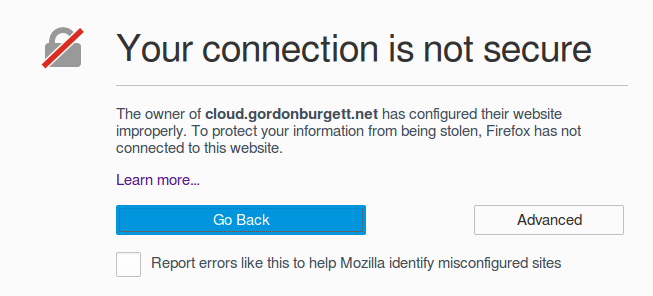
So I took a look at my blog recently to make sure everything is working, and got a big fat “Your connection is not secure” message. Uh oh!
Fortunately I just need to request a new certificate from Let’s Encrypt and install it. I’ve done this before, it’s a 10 minute job. Buuuuuttt…
what if I could automate it? If I spend all afternoon on this I’ll save myself 15 minutes of work every 3 months! That math totally works out right?
What does the XKCD guy have to say about it?
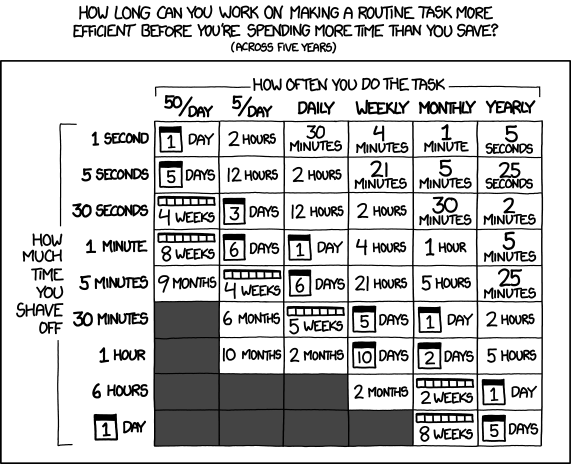
you know, I might actually be right in the sweet spot.
So, let’s get to it. I’ve previously set up a container that intercepts all requests to /.well-known/* so that it can respond to ACME challenges. And
I have acme.sh installed on that container. So the main challenges I need to overcome are formatting the new certs
correctly and interacting with the Docker Cloud API. Shouldn’t be too tough.
Formatting the new certs correctly is the easy part. The hardest thing was figuring out the syntax for find in order to figure out the right files. I
wrote a script that concats the private key into the full chain, then uses sed to turn the newlines into \n strings, which is what Docker Cloud wants.
Most of these lines are little more than copy-paste from google.
| |
The bigger step is uploading that to the Docker Cloud API. I want to use cURL in order to not have to install anything else. That means using the HTTP syntax, specifically the PATCH method of the service API.
Instead of mucking about with trying to discover the services, which was harder than I assumed, I decided to rename my services to match the hostnames of the SSL certs. This was way easier and as a bonus it’s more descriptive in the control panel. Now I have a “gordonburgett-net” service instead of “blog”, and “cloud-gordonburgett-net” instead of “nextcloud”.
| |
One thing I unfortunately discovered, is if I try to patch just the “SSL_KEY” environment variable, it clears out all the other environment variables too.
So I had to figure out how to patch the new value into all the old values using jq. Fortunately I found this guy who has done exactly that:
http://engineering.monsanto.com/2015/05/22/jq-change-json/
Thank you random tech blogger!
| |
The final piece is invoking the PATCH method and uploading the new SSL key. Also need to restart the service to pick up the changes.
Fortunately I looked on Google for how to do a PATCH with cURL before I bashed my head against the keyboard several times. Apparently
-XPATCH doesn’t work, you have to do --request PATCH. This worked fine for me:
| |
There’s still a lot to do before it’s automated, but at least now I don’t have to remember how to combine the stupid files and update the Docker Cloud service myself.
Some of the things to do are:
- Bail out early if the certs don’t need to be replaced
- Better error handling
- Blow my brains out trying to figure out how to do a cron job within the container
All that’s for the next time I have a spare afternoon :)
Update: I got automatic renewal working! (at least I hope, it’s going to be 2 months before any of these certs actually need renewal.)
If you remember a previous post I talked about setting up a
backup script on a cron job. This baby is still humming along just fine,
and it is robust enough that it handles exactly my needs. I’m going to use it to execute my automatic certificate check by setting up
my command as the BACKUP_CMD variable.
First, we need a few modifications to the renewAll script. It needs to automatically restore the ~/.acme.sh/ directory if it’s a new
container, can’t have the script dying there. So here’s my additions to the beginning of the script (see the whole thing on github):
| |
It also needs to check and see if anything actually changed, and not do anything if we didn’t update any certs.
I use an associative array which is a feature of bash 4 in order to keep track of what’s changed.
| |
Now the “updateDockercloud.sh” script needs a tweak as well, it needs to remove the dockercloud.key file when it successfully
updates the service. That was a one-line change. (See the whole thing on Github)
And with those tweaks, I can now run an automated check-and-update with this command:
| |
Almost there, just need to set that as the BACKUP_CMD environment variable. Problem is I’m executing that variable with docker exec, so
I need to wrap it as an invocation to bash in the dockercloud console.

And voila!